
What Is Xtream Codes IPTV? How an Xtream Login Works
Xtream Codes is not a provider and not a channel pack – it is a login format. If your IPTV subscription arrived as a server address, a username and a password rather than one long link, that is an Xtream login. This guide explains what each part does, how it differs from an M3U link, how to load it into a player, and how to tell in seconds whether it is actually working.
On this page
What “Xtream Codes” actually means
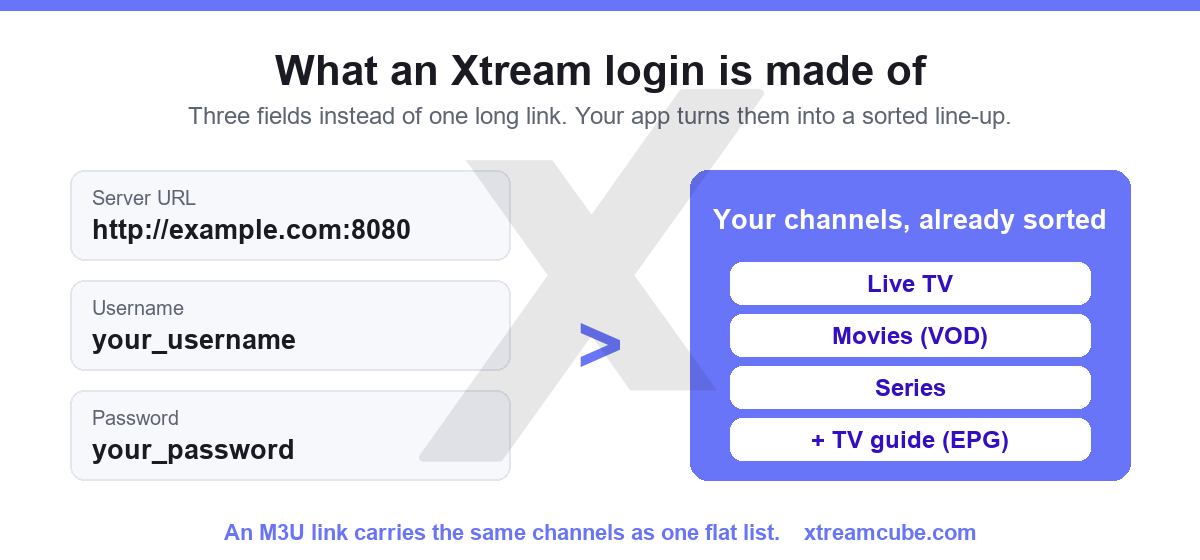
“Xtream Codes” began as software that IPTV providers used to run their service – a control panel plus an API that player apps could talk to. The name stuck. Today, when a provider or an app says it supports Xtream Codes (often written Xtream Codes API), it means one practical thing: you sign in with three fields instead of pasting a single link.
- Server URL – the host, sometimes with a port, for example
http://example.com:8080 - Username
- Password
The app sends those three to the server, and the server answers with your whole line-up already sorted into Live TV, Movies (VOD) and Series, usually with the EPG programme guide attached. That automatic sorting is the entire point of an Xtream login.
What each part of the login does
It helps to know what the app is doing behind the scenes, because it tells you where to look when something fails.
- The server URL (host and port) is the address the app connects to. If the host is wrong, or the port is missing, nothing loads at all – you get a blank list, not a partial one.
- The username and password identify your line. They decide what you are allowed to watch, when your subscription expires, and how many devices can stream at once.
- The output format (the app usually chooses this for you) is how each stream is delivered – commonly an MPEG-TS or HLS stream your player can read.
Because the app builds its own requests from these fields, a single typo in the host or password is the most common reason an Xtream login “does not work” when the subscription itself is fine.
Xtream login vs M3U link – same subscription, two shapes
Most subscriptions can be delivered two ways, and they carry the exact same channels:
- An Xtream login (server + username + password) – the app pulls a sorted, categorised line-up with the guide – our guide to adding the EPG covers it.
- An M3U link – a single URL that returns one flat playlist of everything.
Neither is “better” in quality; they are two shapes of one line. Some players only accept one of them, which is why it is useful to be able to convert between the two. If your device wants an M3U link but you were only given an Xtream login – or the other way round – our free Xtream to M3U converter turns one into the other in your browser, with nothing sent anywhere.
How to load an Xtream login into a player
There are two common flows, depending on the app:
- Apps with an “Xtream Codes API” login screen. You paste the server URL, username and password into three boxes and the app does the rest. This is the most direct method.
- Device-registration players. Some players ask you to register the device first, then add the line through an account or a short code. The underlying login is still the same server, username and password.
If you are choosing an app, our guide to the best IPTV players compares them by exactly this: how you give each one a line. And the full set of free helpers lives on our IPTV tools page. Once you have picked one, our step-by-step TiviMate setup guide walks the whole process.
How to check an Xtream login works
Before you blame the app or the network, confirm the line itself is alive. Paste it into a checker and read what the server answers back – status, expiry date, how many devices are allowed, and the output formats it offers.
- Use the free IPTV line checker to see whether an Xtream login is active, expired or refused – in seconds, for any provider.
- Wondering whether a specific channel, film or series is included? The IPTV channel finder looks it up inside the line and tells you which folder it is in.
If the checker shows the line as active but your app is still blank, the problem is almost always a mistyped host or password, not the subscription.
Is this the same as the old Xtream Codes panel?
An honest note, because it confuses a lot of people: the original Xtream Codes company was shut down in 2020 after action by European authorities. What survived is the login format – the “Xtream Codes API” that countless panels have implemented since. So “Xtream Codes” today describes how you log in, not a single company that is still running. A reputable provider runs its own servers and its own panel; the Xtream login is simply the standard way your app connects to them.
Questions people ask
Is an Xtream login better than an M3U link?
No – they deliver the same channels. An Xtream login arrives pre-sorted into Live, Movies and Series with the guide, which many people prefer; an M3U link is one flat list. Use whichever your player accepts.
Why does my Xtream login say “expired” or “disabled”?
Either the subscription has ended, the device limit is already in use, or the host or password has a typo. Check the line first – an active line that still will not load is nearly always a typing error in the server URL.
Can I turn an Xtream login into an M3U link?
Yes. Paste it into the Xtream to M3U converter and it produces the matching M3U link, or the other way round, entirely in your browser.
Is Xtream Codes safe to use?
The login format itself is neutral – it is just how an app talks to a server. What matters is the provider behind it: choose one that runs stable servers, is transparent about billing, and lets you test before you commit.
Try an Xtream login on a real line
XtreamCube gives you both an Xtream login and an M3U link for the same subscription, so you can use whichever your device prefers – no account needed to test. Start a free trial and load it into your player in a couple of minutes.